
Every feature your family needs
Kinovia is purpose-built for families. Here is a tour of everything inside the app — designed to help large, multi-generational families stay connected across generations.
Real app. Real families.
These are actual screenshots from the Kinovia app.
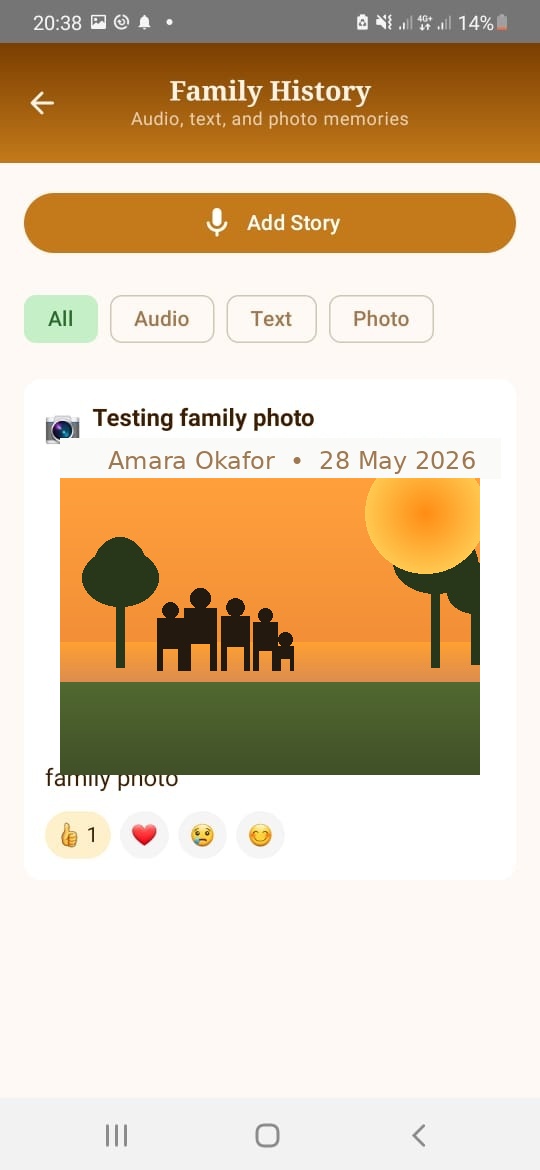
Family History — audio, text & photo stories with emoji reactions
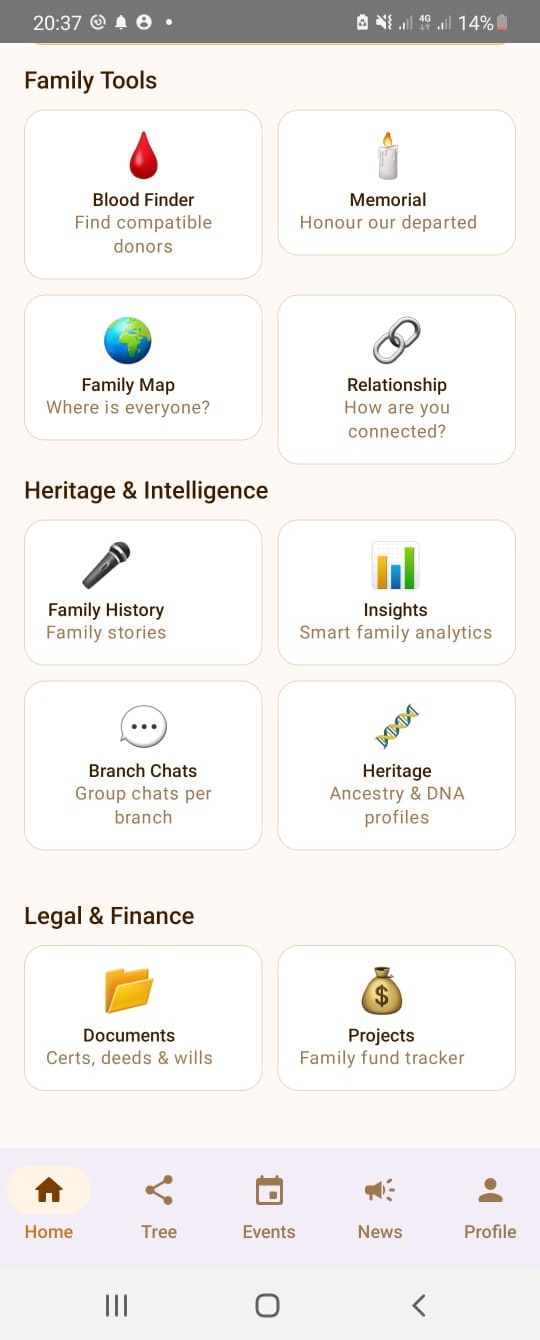
Home screen — Family Tools, Heritage & Intelligence, Legal & Finance
Family Tree Builder
Build a rich, fully visual family tree with photos, birth dates, death dates, locations, occupations and relationship links across unlimited generations. The tree grows with your family — add members at any time.
Every node on the tree is a clickable profile. Tap any relative to see their full heritage profile, documents they have made visible and their relationship path back to you.
- ✓Unlimited generations and branches
- ✓Profile photos for every member
- ✓Birth, death and anniversary dates
- ✓Birth location and current city
- ✓Multiple relationship types
- ✓Visual zoom and pan on large trees
Document Vault — Family & Personal
The Document Vault has two layers. The Family Vault is managed by admins and holds shared family documents — land papers, wills, birth certificates — visible to all members.
Every member also has a Personal Vault for their own private documents — ID cards, medical records, personal wills. Personal documents are invisible to everyone else under normal circumstances. Admins only gain emergency read-only access when a member's safety alert threshold is exceeded.
- ✓Upload PDFs, images and scanned documents
- ✓Family Vault — shared documents managed by admins
- ✓Personal Vault — private to each member
- ✓Emergency admin access on welfare alert only
- ✓Organised by document type
- ✓500 MB free — up to 20 GB on Heritage plan
Family History — Audio, Text & Photo
Family History is your family's shared memory archive. Three story formats let every member contribute in the way that feels natural to them — voice recordings, written accounts or photo stories with captions.
Admins post Family Stories visible to all members. Individual members post Personal Stories and choose whether to share them with the family or keep them private. React to stories with emoji. Posting limits keep the feed curated — members can post 3 stories per month with a 5-day cooldown.
- ✓🎤 Audio — voice narrative recordings
- ✓📝 Text — written memories and accounts
- ✓📷 Photo — images with captions
- ✓Family Stories (admin) visible to all
- ✓Personal Stories — share or keep private
- ✓Emoji reactions: 🌳 ❤️ 😢 😊
Family History — All, Audio, Text and Photo filter tabs
Blood Finder
In a medical emergency every second counts. Blood Finder lets any family member instantly see which relatives have a matching or compatible blood type — turning your family tree into a potential lifeline.
Members add their blood group to their profile during setup. The Blood Finder searches all confirmed members by compatibility and shows their contact details so you can reach them immediately.
- ✓ABO and Rh compatibility matching
- ✓One-tap search from any screen
- ✓Shows member name, photo and contact
- ✓Filters by family branch or location
- ✓Available on all plans including free
- ✓Works offline using last known data
Member Safety
Member Safety is a welfare check system built for the reality of large, dispersed families. Members travelling, living alone or in areas with poor connectivity can use it to let their family know they are safe.
Each member sets their own inactivity threshold — from 1 to 30 days. If they do not check in within that period, all family admins receive a welfare alert. A green 'I'm Safe' card appears on the member's Home screen — one tap resets the timer instantly.
- ✓Customisable inactivity threshold (1–30 days)
- ✓One-tap 'I'm Safe' check-in card on Home screen
- ✓Last known location at city/district level
- ✓Travel notes to give admins context
- ✓Emergency access to vault and profile
- ✓Alerts go to all admins simultaneously
Heritage Profiles
Every family member owns and edits their own Heritage Profile — origins and homelands, ethnicity, languages, blood group, and any DNA test results they have, including provider and haplogroups. Nobody else edits your profile but you.
Admins curate a separate Family-Wide Ancestry record — the family's established origins, ethnic composition and known lineage. A private Comparison view then shows each member how their own heritage lines up with the family record, marked simply as consistent, differs, or no data — informational only, never presented as proof of belonging.
- ✓Each member edits their own heritage data
- ✓Admin-curated family ancestry record
- ✓Personal vs family comparison view
- ✓DNA test results, provider and haplogroups
- ✓Languages and origins across the family
- ✓Privacy-first: sensitive data never exposed per-person
Memorial Pages
When a loved one passes, their Memorial Page becomes a living tribute — a place where the whole family can gather, remember and celebrate their life.
The page shows their full biography, a gallery of photos, a timeline of their life's milestones and a wall where family members can leave tributes, voice messages and reactions.
- ✓Photo gallery and life timeline
- ✓Family tribute wall with reactions
- ✓Voice note tributes
- ✓Death anniversary reminders
- ✓Legacy documents linked from the Vault
- ✓3 memorial pages free — unlimited on paid plans
Branch Chats
Branch Chats are private group messaging channels organised by family branch. Instead of one overwhelming family group, each branch of the family tree has its own dedicated space.
Admins create channels for specific branches, occasions or interest groups. The Super Admin can also send broadcast messages to the entire family at once.
- ✓Separate channels per family branch
- ✓Text, photo and voice messages
- ✓Broadcast messages to whole family
- ✓Pin important messages
- ✓Mention specific members with @
- ✓1 channel free — unlimited on paid plans
Everything else inside the app
Family Map
See where your family members are located around the world — at the city level. Useful for planning visits and understanding your family's geographic spread.
Relationship Finder
Enter any two members and instantly see how they are related — uncle, second cousin, great-grandparent. Essential for large families that span many generations.
Smart Insights
Privacy-safe analytics about your family — members and generations, branches, age groups, most common blood group, ethnic origins, languages and DNA-test participation. Sensitive data is always aggregated and never traced to any single person.
Projects
Track family fund contributions, shared financial goals and co-operative projects — visible to the right people within your family space.
Relationship Certificates
Generate official, printable PDFs proving the family relationship between any two members. Verified and signed by your Super Admin. Useful for visa and estate matters.
Events & Announcements
Admins post family events — reunions, weddings, naming ceremonies — and announcements. Push notifications keep every member in the loop.
Weekly Digest
Every Sunday: new members who joined, upcoming birthdays, new events and family milestones — all in one weekly notification so nobody misses anything.
Private & Secure
Invite-only access, Firebase Authentication, App Check, and server-enforced Firestore security rules. Your family's data belongs only to your family.
Ready to try it yourself?
Download Kinovia free. Your first 10 family members are included forever.
Download Free on Google Play